
Mixxx
Free DJ software that gives you everything you need to perform live mixes
Download Now
Free for Windows, macOS, Linux. No registration required.
One of over 130 tools we've selected. No paid listings.
How we review software →Screenshots
About Mixxx
Mixxx is a free, open-source DJ application that turns an ordinary laptop into a complete mixing setup. Built by a community of DJs and programmers rather than a company, it gives beginners and working performers the tools to blend tracks live: beat matching, key detection, effects, loops, and full hardware controller support, with no license fee and no feature lock.
Everything You Need to Mix Live
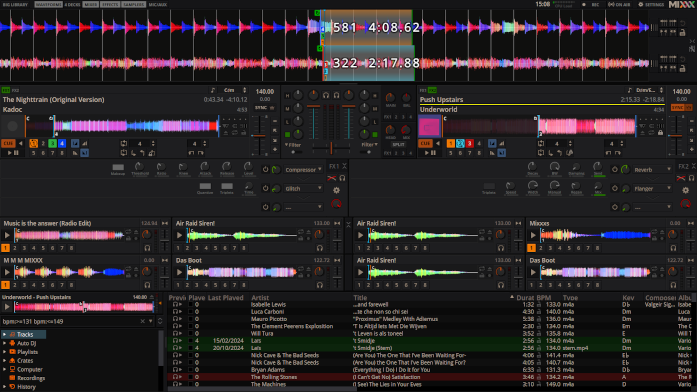
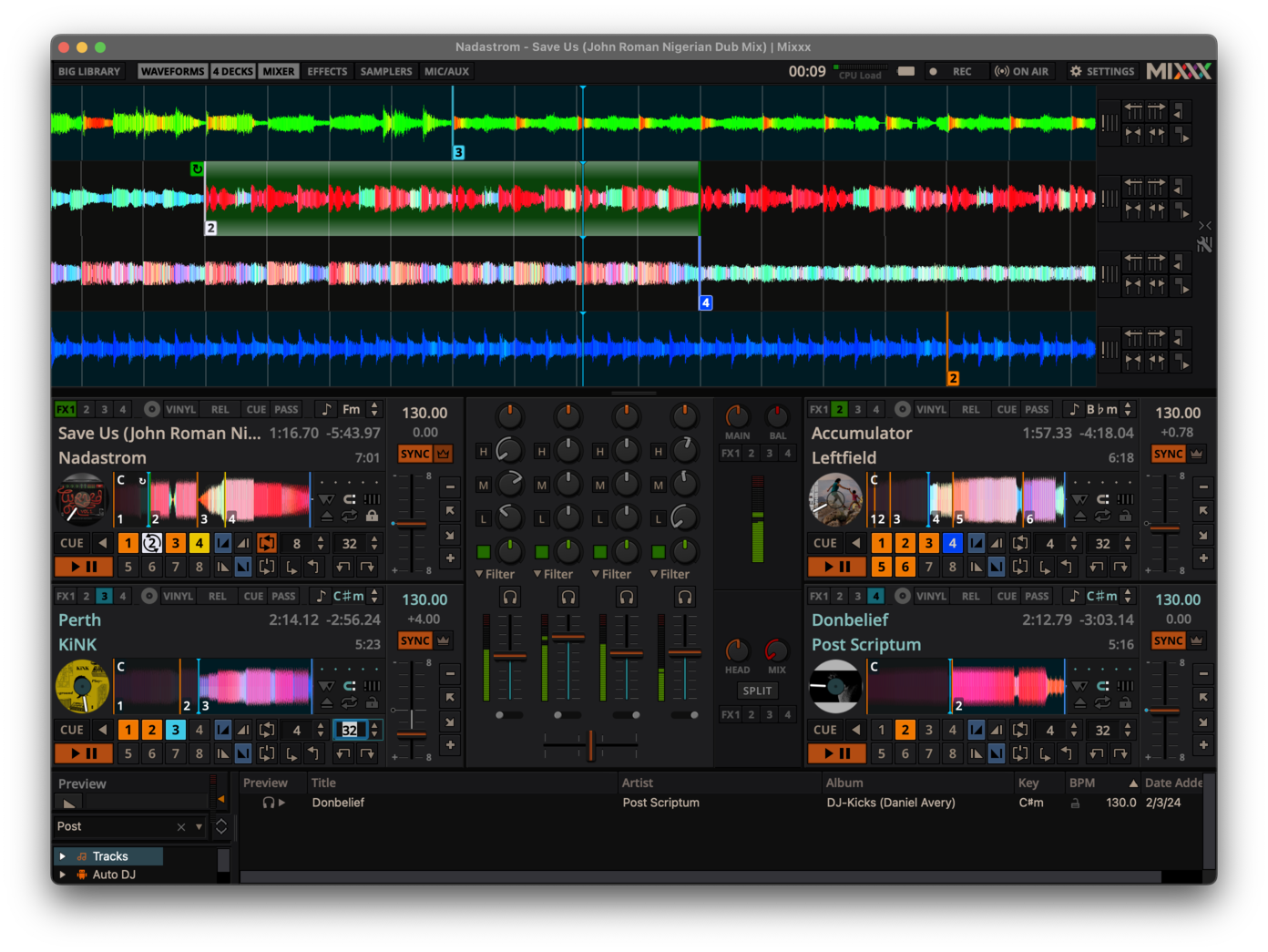
Mixxx analyzes your music library automatically, detecting BPM and musical key so you can pick compatible tracks at a glance. Sync Lock keeps up to four decks aligned to the same tempo and beatgrid, which makes smooth transitions achievable even while you are still learning to beatmatch by ear. Each deck offers hot cues, adjustable loops, and EQ with kill switches, so the standard techniques of club DJing are all within reach. Scrolling parallel waveforms show exactly where beats line up before you bring a track in, and the included skins let you pick a layout that fits your screen.
Hardware and Vinyl Control
One of Mixxx's biggest strengths is broad controller support. Built-in mappings cover popular DJ controllers from major manufacturers, and a programmable mapping system lets you adapt almost any MIDI or HID device to your workflow. For turntablists, Mixxx supports timecode vinyl: connect turntables or CD decks through a compatible audio interface and control your digital files as if they were pressed on wax, with a passthrough mode for mixing real records into the same set.
Effects, Broadcasting, and Library Tools
A chainable effects rack combines filters, echoes, flangers, and more, with dedicated controls for hands-on tweaking. Mixxx can broadcast your set live to internet radio servers, record mixes directly to disk, and keep an event running with Auto DJ playlists when you step away from the booth. It reads the common audio formats, imports libraries and cue points from other DJ tools, and runs on Windows, macOS, and Linux, so your collection and settings travel between machines. Sampler decks round out the setup for dropping jingles and one-shot sounds over a mix.
Where It Falls Short
Mixxx is powerful but not the most polished option. The interface prioritizes function over looks and can feel dense on small screens. Hardware without a built-in mapping requires manual configuration, which takes patience. It also lacks conveniences of commercial DJ software, such as integrated streaming-service catalogs: you play files you own rather than pulling from a subscription library. Multi-channel audio interfaces can need careful setup, and older computers may struggle with four decks plus effects.
A Community Project That Keeps Improving
Because Mixxx is community-driven, every feature is available to everyone: there is no paid tier, no trial period, and no account requirement. The trade-off is that help comes from a detailed manual, forums, and fellow users rather than a support desk. For bedroom DJs learning the craft, mobile DJs on a budget, and open-source enthusiasts who want full control of their tools, Mixxx remains one of the most capable free music applications available.
Key Features
Four-Deck Mixing with Sync
Mix up to four tracks at once with automatic beat and tempo matching, parallel scrolling waveforms, and BPM and key detection across your whole library.
DJ Controller Support
Use built-in mappings for popular controllers or program your own with the MIDI and HID mapping system for hands-on control of every feature.
Timecode Vinyl Control (DVS)
Connect turntables or CD decks with a compatible audio interface to control digital tracks with real vinyl, including passthrough for mixing records.
Effects, Loops and Hot Cues
Shape your sound with chainable effects, beat-synced loops, hot cues, EQ kill switches and sampler decks for one-shot sounds.
Pros & Cons
Pros
- Completely free and open source, with every feature unlocked and no account required
- Excellent hardware support: built-in controller mappings plus timecode vinyl control
- Runs on Windows, macOS and Linux with the same feature set
- Community-driven development with a detailed manual and active forums
Cons
- Interface feels dense and less polished than commercial DJ software
- No integrated streaming-service catalogs; you play files you own
Frequently Asked Questions
Is Mixxx really free?
Yes. Mixxx is free and open-source software released under the GNU GPL v2 or later. There is no paid or "pro" version, no trial period, and no account requirement. Donations to the project are welcome but never required.
Can I use Mixxx with a DJ controller?
Yes. Mixxx includes built-in mappings for many popular DJ controllers, and its programmable mapping system supports almost any MIDI or HID device. You can customize an existing mapping or create your own to match your workflow.
Does Mixxx work with timecode vinyl (DVS)?
Yes. With a compatible multi-channel audio interface and timecode vinyl or CDs, you can control digital tracks using turntables or CD decks. A passthrough mode lets you mix real records into the same set.
Quick Info
Screenshots