The Best Free Software for Privacy in 2026 (A Realistic Setup)
I've been building a private digital life since 2018. Not because I'm paranoid, not because I have anything to hide, but because I got tired of feeling watched. Every search query logged. Every email scanned. Every step counted. Every purchase analyzed. The realization that I was the product of about 40 different companies at once.
Eight years later, my digital footprint is dramatically smaller than the average person's. I still use the internet for everything. I still have a job, friends, a normal social life. I just stopped feeding every interaction into the surveillance economy.
This article is the realistic version of "privacy software in 2026." Not the cypherpunk fantasy where you live on Tails OS, never use a phone, and pay for everything in Monero. That setup is real but it's also a full-time job. This is what works for normal people who want most of the benefits of digital privacy without giving up their entire life.
I'll tell you what I actually use, what I tried and dropped, and what compromises I make. No purity tests. No "if you use X you're not really private." Just the practical setup that's worked for me for years.
The Realistic Privacy Threat Model
Before recommending tools, let's talk about who you're actually protecting yourself from. This matters because the right tools depend on the actual threat.
Most people are not being targeted by intelligence agencies. If they were, no consumer software would save them. Real targeted surveillance defeats almost everything in this article. If you're a journalist working with whistleblowers or an activist in an authoritarian regime, you need specialized advice, not a blog post.
Most people are being mass-surveilled by:
Advertisers building profiles to sell ads
Data brokers buying and reselling everything about you
Apps that demand permissions they don't need
Browsers that track every site you visit
Operating systems that phone home constantly
"Free" services that monetize your behavior
This is what realistic privacy software addresses. Reducing the surface area of your data exposure to companies you've never heard of. Making yourself a less profitable target. Slipping out of the easy-tracking category into the "actual work required" category, where most surveillance simply gives up.
That's an achievable goal with free software. Let's get into it.
The Browser: Where Most Privacy Wins or Loses
Your browser is where 80% of your digital privacy is determined. Get this right and the rest gets easier. Get it wrong and nothing else matters much.
Firefox with proper configuration.
Firefox out of the box is decent. Firefox properly configured is excellent. The combination I run:
uBlock Origin as the only ad and tracker blocker. Disable everything else.
Privacy Badger from EFF as a secondary layer (optional, may overlap with uBlock)
Multi-Account Containers to isolate Google, Facebook, banking, work into separate containers
LocalCDN to load common scripts locally instead of from tracking CDNs
Strict tracking protection turned on in settings
Cookies cleared on close (with exceptions for sites you actually use)
DNS over HTTPS pointing to a privacy-respecting resolver (NextDNS, Mullvad DNS, or Quad9)
This configuration takes 20 minutes to set up. After that, Firefox blocks most tracking automatically. You'll notice that ads disappear and pages load faster.
LibreWolf as the easy mode.
If you don't want to configure Firefox yourself, LibreWolf is Firefox with all the privacy settings pre-configured. Install it, use it, done. It's what I recommend to friends who don't want to fiddle with settings.
Brave for Chromium compatibility.
If a site doesn't work in Firefox (rare but happens), Brave is the fallback. Built on Chromium, has built-in ad blocking, supports Chrome extensions. The crypto features can be ignored. It's a solid second browser for compatibility.
Things to avoid: Chrome, Edge, Opera, and the various "privacy" Chromium forks owned by companies you've never heard of. Chrome is the surveillance browser. Edge has gotten more aggressive with Microsoft account requirements. Opera was acquired by a Chinese consortium in 2016 and the privacy practices have been questioned since.
Search Engines: Stop Feeding Google
Every Google search is logged, associated with your profile, and used to refine ads. This is the easiest privacy win and most people skip it.
DuckDuckGo is the default recommendation for good reason. Searches aren't logged, no profile is built, results are decent for most queries. Owned by an independent US company with a long privacy track record.
Brave Search is genuinely good in 2026. Their independent index has matured. They make money from optional paid plans, not from selling your data.
Startpage gives you actual Google results without Google seeing you. Useful when DuckDuckGo's results aren't quite right and you want Google quality without Google tracking.
Kagi is paid (around €10/month) but worth mentioning as the gold standard. No ads, no tracking, results curated for actual quality. If privacy plus excellent results matters to you and you can afford it, Kagi is the right answer. Not free, but listed because the alternatives exist.
Things to avoid: Bing as your default, Yandex, "private" search engines you've never heard of that might just be wrappers selling your data.
Email: The Hardest Part
Email is fundamentally broken from a privacy standpoint. The protocol leaks metadata everywhere. Your email provider can read everything by design. Switching email is hard because everything is tied to it.
But you can still improve dramatically.
Proton Mail is the obvious choice. Swiss-based, end-to-end encrypted for emails between Proton users, zero-knowledge architecture. The free tier gives you 1GB of storage and 150 messages per day, which is enough for many people.
The catch: emails to non-Proton users aren't encrypted in transit beyond standard TLS. The recipient's provider can still read them. Proton doesn't fix email, it just makes your end of the conversation private.
Tutanota is the German alternative. Different encryption approach, also good. The interface is more functional than Proton's. Free tier is similar.
Strategy that works:
Switch your primary email to Proton Mail or Tutanota
Use SimpleLogin (owned by Proton, free tier available) to create email aliases for every service. Sign up for a newsletter? Use an alias. Spam from one alias? Delete it.
Keep your old Gmail for legacy purposes, gradually migrate accounts
Never use "Sign in with Google" or "Sign in with Apple" again
This is a multi-year migration for most people. Start now and you'll be mostly free in two years.
Thunderbird is the desktop client that ties this together. Works with Proton (via the Proton Mail Bridge), Tutanota (via paid tier integration), Gmail, and everything else. Local storage means your email works offline and the local mail provider can't sell your sorting habits.
Messaging: The Easy Win
This is the simplest privacy improvement available and most people still haven't made it.
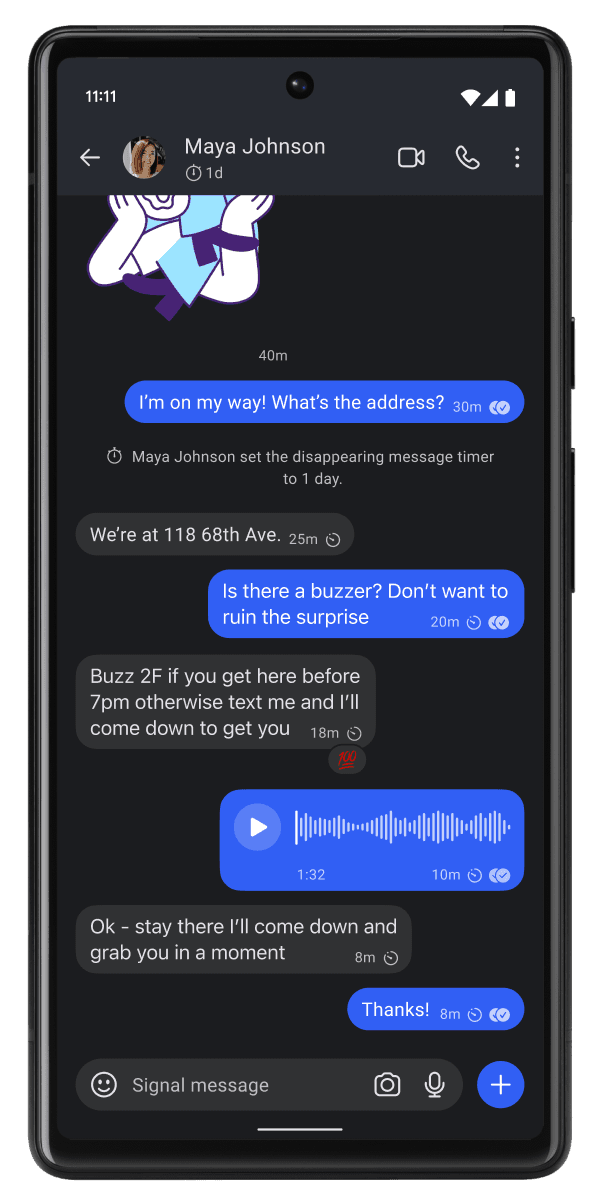
Signal is the obvious choice. End-to-end encrypted by default. Open source. Run by a nonprofit foundation. Free. Works on every platform. Voice and video calls included.
The only real downside: your contacts need to use it too. This is where the network effect bites. But you'd be surprised how many people will install it if you ask. Most "I don't have Signal" actually means "I haven't installed it yet because nobody asked me to."
Wire as an alternative if Signal isn't an option. Swiss company, end-to-end encrypted, business-focused but has a personal tier.
Session is a Signal fork that removes the phone number requirement. Slower, smaller network, but more anonymous.
SimpleX is the cutting-edge option. No phone number, no identifier of any kind, fully decentralized. Newer, smaller community, but technically the most private messenger available.
Things to avoid: WhatsApp (Facebook owns it, metadata is collected even if messages are encrypted), Telegram (not actually end-to-end encrypted by default, and the encryption isn't audited), Facebook Messenger, anything provided by a major tech company "for free."
File Storage and Sync
Your files are some of the most sensitive data you have. Documents, photos, work files, financial records. The default options (iCloud, Google Drive, OneDrive, Dropbox) all scan your files. They legally have to in some cases, and they all do it for "safety" and "AI training" reasons.
Syncthing is the answer for syncing between your own devices. Open source, encrypted, peer-to-peer. Your laptop talks directly to your desktop. No cloud server is involved at all. Free forever, works on every platform.
This is what I use for my main file sync. Once it's configured (which takes some patience), I never think about it. My files are on my devices and nowhere else.
Proton Drive: for actual cloud storage that respects privacy. End-to-end encrypted, generous free tier (5GB). Same Swiss company as Proton Mail. The mobile and desktop apps have matured enough to use seriously.
Filen is the alternative. Also end-to-end encrypted, 10GB free, German company. Less polished than Proton Drive but the free tier is more generous.
Cryptomator is the bonus tool. It encrypts a folder so you can store it in any cloud (including the bad ones) while keeping the contents private. Useful for the transition period when you're still using Google Drive but don't want them reading everything.
FilesLock is a platform focused on protecting and controlling access to sensitive files. The service helps secure documents through features such as encryption, permission management, and controlled sharing to prevent unauthorized access. Its goal is to provide businesses and individuals with a simple and reliable way to protect confidential data while enabling secure online file sharing.
Things to avoid: Google Drive, iCloud, OneDrive, Dropbox for anything sensitive. Use them only for files you'd be comfortable emailing to a stranger.
Photo Management
Photos contain a huge amount of personal data. Location, faces, dates, contextual information. The default photo cloud services build profiles based on every photo you take.
Immich is the self-hosted Google Photos alternative. Install it on a home server or rented VPS, get the same convenient photo backup and search without Google. Has gotten genuinely excellent in 2025.
PhotoPrism is the alternative. Similar concept, slightly different feature set, also excellent.
Ente Photos if you want it as a service instead of self-hosting. End-to-end encrypted, free tier is small but real.
For most people, just keep photos locally is also a valid answer. Modern phones have plenty of storage, computers have lots of disk space, and not everything needs to be in the cloud.
Password Management
Critical for privacy because reusing passwords means one breach compromises everything.
I covered this in depth in another article. Short version:
Bitwarden for most people. Free, open source, works everywhere.
KeePassXC for users who don't want any cloud dependency.
Proton Pass if you're already in the Proton ecosystem.
Any of these is dramatically better than browser-stored passwords, reused passwords, or a notes file.
VPN: When You Actually Need One
Covered this in detail elsewhere too. Quick summary:
VPNs are useful for hiding your IP from websites and protecting yourself on public WiFi. They're not anonymity tools.
Proton VPN free for unlimited use with a 5-country server choice
Mullvad (€5/month, not free) for the most privacy-focused commercial option
Avoid most "free" VPNs because the business model doesn't work without monetizing you
Operating System: The Big Lift
This is where privacy gets harder. Your operating system is the foundation of everything else. Windows phones home constantly. macOS phones home almost as much. Both have been adding more telemetry, not less, in recent years.
Afficher l'image
Linux is the privacy-friendly OS. In 2026, it's actually usable for normal people in ways it wasn't even five years ago.
Linux Mint is the gentle entry point. Looks and works like Windows. Most things "just work." If you can browse the web and open documents, you can use Linux Mint.
Fedora Workstation is what I use. More modern, more polished, slightly steeper learning curve. Excellent if you want current software and good hardware support.
Ubuntu is the popular default. Be aware that Canonical (Ubuntu's company) has added some telemetry and the snap package system has corporate ties. Still privacy-respecting compared to Windows, but not the purest option.
For maximum privacy without going full paranoid: Linux Mint or Fedora, no Google services connected, run the privacy stack above. This setup respects you completely without requiring expertise.
If you can't switch to Linux:
Use Windows 11 with all telemetry disabled (via O&O ShutUp10++)
Don't sign in with a Microsoft account where possible
Audit which apps have which permissions
Run the rest of this privacy stack on top
It's not perfect but it's a real improvement over default Windows.
Mobile: The Worst Privacy Environment
Your phone is the worst privacy device you own. It has GPS, microphones, cameras, and apps with too many permissions. It's also where most people spend most of their digital life.
Android with degoogled options:
GrapheneOS if you have a Pixel phone. The gold standard of privacy-respecting Android. Hardened security, no Google services by default, easy to use.
CalyxOS as a Pixel alternative with more middleware compatibility.
LineageOS for older phones that aren't Pixel.
iPhone: less control over the system, but Apple's privacy practices are better than Google's for what they collect. Not great, but better. Configure aggressively: disable analytics, advertising tracking, app tracking transparency, location for apps that don't need it.
Apps to avoid on any phone: TikTok, Facebook, Instagram, anything by Meta, anything in the "free games with ads" category. These are surveillance tools first and apps second.
Apps that improve mobile privacy:
NetGuard (Android) to control which apps can access the network
Bouncer (Android) for temporary permission grants
Aurora Store to install Android apps without a Google account
F-Droid for purely open source Android apps
DNS: The Hidden Layer
Every domain your devices contact starts with a DNS lookup. Your DNS provider sees everything you visit, even with HTTPS. Most people use their ISP's DNS by default, which means their ISP has a log of every site they've visited.
Quad9 (9.9.9.9) is the easiest privacy upgrade. Free, doesn't log, also blocks known malicious domains.
NextDNS is the customizable option. Free tier covers most use cases. Block ads, trackers, adult content (if you want), specific categories, all at the DNS level so it works on every device.
Mullvad DNS is the option for Mullvad customers but anyone can use it for free.
Setting your home router to use one of these instead of your ISP's DNS protects every device on your network. It takes 5 minutes and most people never do it.
What I Actually Use (Realistic Setup, 2026)
Category | What I use | Free? |
|---|---|---|
OS (laptop) | Fedora Workstation | Yes |
OS (phone) | GrapheneOS on Pixel | Yes |
Browser | Firefox (configured) | Yes |
Search | Kagi (paid), Brave Search (free) | Mixed |
Proton Mail (paid Plus) | Yes for personal use | |
Email aliases | SimpleLogin via Proton | Yes |
Email client | Thunderbird | Yes |
Messaging | Signal | Yes |
File sync | Syncthing | Yes |
Cloud backup | Proton Drive | Free tier |
Photos | Local storage + manual backup | Yes |
Passwords | Bitwarden + KeePassXC for sensitive | Yes |
VPN | Mullvad | Paid (€5/month) |
DNS | NextDNS | Free tier |
Notes | Obsidian (local files) | Yes |
Office | LibreOffice | Yes |
AI | Local Ollama models + occasional Claude | Mixed |
Total monthly cost: about €15. Time saved by not seeing ads or being tracked: significant. Mental relief from not being part of the surveillance economy: enormous.
The Compromises I Actually Make
Honest disclosure of what I haven't given up:
YouTube. I watch it. Google sees my viewing history. I use a separate browser profile and clear cookies regularly, but I haven't moved fully to alternatives like Piped or Invidious yet.
Some social media. I have a LinkedIn for professional reasons. They know me. I post nothing personal there.
A few specific apps that require Google services on a backup phone. Banking apps, government apps. I run them on a dedicated device with nothing else on it.
Smart home stuff is minimal. No always-listening speakers. No connected fridges. Some smart lights via Home Assistant (local) instead of vendor cloud services.
Nobody runs a perfectly private digital life unless they've made it their job. The goal is to opt out of the easy mass surveillance while still living a normal life.
The Cumulative Effect
Each individual tool above provides marginal privacy improvement. The cumulative effect is dramatic.
After six months of running this stack:
Targeted ads stopped feeling weirdly accurate
Email spam dropped to almost nothing (thanks to aliases)
Random apps stopped asking for invasive permissions
My phone stopped feeling like it was listening
My computer ran noticeably faster (no telemetry overhead)
I stopped feeling watched
That last one matters more than people realize. Living in surveillance changes how you act. You self-censor. You feel observed. Stopping that feeling is itself a meaningful improvement in quality of life, separate from any concrete privacy threat.
What to Watch in 2026
The privacy landscape keeps shifting. Things I'm tracking this year:
Continued attempts at chat control legislation in the EU. This would mandate scanning of encrypted messages. Signal has said they'd leave the EU before complying. Other tools may not.
AI training scraping. More sites are quietly using your activity to train AI models. The fight to opt out is ongoing.
Browser fingerprinting evolution. As traditional tracking gets harder, fingerprinting gets more sophisticated. Firefox and Brave continue to fight this but it's an arms race.
Identity verification creep. More platforms are requiring real ID. Privacy practices vary widely.
The post-Skype messenger consolidation. Microsoft's shutdown of Skype in 2025 pushed users in many directions. The new equilibrium is still settling.
Where to Start If This All Feels Overwhelming
Don't try to do everything at once. Most people who try the full switch burn out by month two.
Month 1: Install Firefox with uBlock Origin. Change your search engine to DuckDuckGo or Brave Search. Install Signal and tell three friends to install it too.
Month 2: Set up Bitwarden. Audit your password situation. Enable two-factor authentication on important accounts.
Month 3: Create a Proton Mail account. Start migrating less-important accounts to it. Don't try to switch everything at once.
Month 4: Set up Syncthing between your devices for sensitive files. Reduce your Dropbox/Google Drive usage to only non-sensitive files.
Month 5: Configure your router's DNS to use Quad9 or NextDNS.
Month 6: Audit which apps have which permissions on your phone. Uninstall the worst offenders.
After six months of incremental changes, you have a dramatically more private digital life without ever feeling overwhelmed. By the end of year one, the basics are habits.
The Honest Final Thought
Perfect privacy is impossible. You either live in the woods with no devices or you accept some exposure. The question isn't "can I be fully private?" It's "can I be less profitable to surveil than the average person?"
That's an achievable goal. The tools in this article, even partially adopted, take you from "easily profiled by ad tech" to "actual work required to track me." Most surveillance isn't actually motivated enough to do that work. They move on to easier targets.
You become invisible by being inconvenient. That's the realistic privacy strategy in 2026.
The free software that makes this possible is in better shape than it's ever been. Linux is usable. Firefox is competitive. Signal works. Proton Mail is mature. Bitwarden is excellent. The infrastructure for opting out of surveillance exists and most of it costs nothing.
Pick one tool from this article and install it this week. Build the habit. Add another next month. In a year you'll be in a place that seemed impossible when you started.
The surveillance economy works because almost nobody opts out. Be one of the people who does.